Sunday, May 4, 2014

Thursday, May 1, 2014
iBook Summary

This is an image from our group iBook which was a final group project for EDM 310. In this book we covered many of the tools that we used as well as what we learned. This consisted of the SMARTboard, movie book review, book trailers, as well as blog posts. The theme of the book was the movie "Cars", and in it we titled each chapter based on a car theme. We had trouble at first figuring out how to use the program, but once we got the hang of it we enjoyed creating the book.
Saturday, April 26, 2014
C4T #4
C4T #4 Comment #1
Royan Lee posted Important Internet and Security and Privacy Advice for Educators:An Interview with Jessy Irwin. This was an interesting post that gave you different ways to protect yourself on the internet, such as not having the same password for everything you use in the classroom or in your personal life. This is important to remember since if someone finds out your password, they could potentially get into any program that you have set up with the same password. It is also important to read the terms and conditions of programs that you are signing up for. I know I myself am guilty of not reading through the terms and conditions and just hitting okay since I think it is a program I can trust. We need to read through these terms and conditions to be sure that personal information is not going to be given out, and our identity is protected.
C4T #4 Comment #2
This week Royan Lee posted on Assessment in Technology. This was a great video to watch especially if you are uneasy about the use of technology in the classroom. Lee comments at one point that the posture of the student has changed in the classroom and then gives and image to explain. He says that if you are not used to this in the classroom it can be slightly disturbing to the teacher at first. In my opinion that Lee talks about might be one reason for why some educators are so against technology in the classroom. Students might come off as not paying attention, when in reality they are engaged and learning. I also learned about several useful technology tools called Skitch and Evernote. These are tools used to organize information in one place and can be accessed from your computer, tablet, or phone. You can even share your ideas and information with others to collaborate as a group.

C4K Summary for April
C4K #9 Rocky
This weeks C4K student was Rocky, a student in Mrs. Nua and Mr. Barks class. He posted on Fia Fia, which is a dance competition or show. The dance that his group did was called gailau. I could not find any information on gailau, but I did look up Fia Fia since I was not sure what it was. I found that they are dance shows which consist of native dances done by a group of individuals.

C4K #10 Akosita
This weeks C4K student was Akosita, a student in Ms. Lavakula's class. She posted on a game she played called "Cops and Robbers". This is a game that helps children to plot coordinates on a graph. Students have to determine whether to go up,down, right, or left based on numbers given to them. Akosita did a tremendous job on putting a working link as well as a screenshot on her blog. I even tried the game and enjoyed playing it since you want to try and beat your previous score.
Sunday, April 20, 2014
Blog Post #13
What did I leave out?
This week we were assigned to do a blog post on what we believe Dr. Strange should have included in our class assignments. In my opinion it would be a good idea to have a blog post on how we would use Apple products, such as the iPad, in the classroom. I know we had several assignments where we needed to use a MacBook, but we have not really covered how we would use Apple products in the classroom. For this post I am focusing more on the iPad since Baldwin County is giving many of the Elementary schools iPads for every student. At first I was thinking that it would be hard to have all your students using the iPads at the same time, so maybe they should just be used for research or working on school based games. Upon further research I found that there are many ways to use the iPads in the classroom, even for the younger students. Would you use it similar to how Ms. Kristina Kellogg used the iPads in her room? What kind of applications would you have on the iPads for your students to learn from? I mentioned a tool called Educreations in one of my earlier blog posts that makes use of the iPad to teach or reteach students concepts. This makes use of videos that can be made by their teacher, or they can find videos by another teacher. These videos are similar to watching a teacher write on a white board while explaining the topic, and these videos can be seen over and over again. Another resource that could be used with the iPads would be with the Apple TV. I think it would be a helpful tool to use in the classroom to allow students to share projects that they have created with the class. These are just a few of the possibilities I found on how to use the iPad in the classroom. How else would you use the iPad or any other Apple product in your classroom?

This week we were assigned to do a blog post on what we believe Dr. Strange should have included in our class assignments. In my opinion it would be a good idea to have a blog post on how we would use Apple products, such as the iPad, in the classroom. I know we had several assignments where we needed to use a MacBook, but we have not really covered how we would use Apple products in the classroom. For this post I am focusing more on the iPad since Baldwin County is giving many of the Elementary schools iPads for every student. At first I was thinking that it would be hard to have all your students using the iPads at the same time, so maybe they should just be used for research or working on school based games. Upon further research I found that there are many ways to use the iPads in the classroom, even for the younger students. Would you use it similar to how Ms. Kristina Kellogg used the iPads in her room? What kind of applications would you have on the iPads for your students to learn from? I mentioned a tool called Educreations in one of my earlier blog posts that makes use of the iPad to teach or reteach students concepts. This makes use of videos that can be made by their teacher, or they can find videos by another teacher. These videos are similar to watching a teacher write on a white board while explaining the topic, and these videos can be seen over and over again. Another resource that could be used with the iPads would be with the Apple TV. I think it would be a helpful tool to use in the classroom to allow students to share projects that they have created with the class. These are just a few of the possibilities I found on how to use the iPad in the classroom. How else would you use the iPad or any other Apple product in your classroom?

Wednesday, April 16, 2014
Saturday, April 12, 2014
Sunday, April 6, 2014
Blog Post #11
Chloe Woodham:
In the video Back To The Future, Mr. Brian Crosby tells us about how he gets his class of multicultural and at risk students to learn how to use project based learning. He starts off by telling us about his class and how most of his students do not know what city they live in. Crosby uses technology to gain the interest of his class. The students use laptops to connect to different students around the world. Mr. Crosby collaborated with a local university to create a balloon that would carry a camera and microphone into the different layers of the atmosphere. By doing this, students were able to see first hand the journey that the balloon made. The students were able to create the payload of the balloon and take a hands on approach to this project creating a highly motivating learning environment. They were each asked to write a story about the balloons journey from the perspective of the balloon. These stories were then posted to a class blog along with photos and videos to be shared with the world in a project called “High Hopes”. The students made stratocards with the high hopes that they had for their lives and this also allowed students around the world to post theirs as well. This project also tied into the science atmosphere with cultural and language learning. In this way, children around the world were able to share ideas and information which makes the world a smaller, more neighborly place. What we can learn from this is that teaching is not about giving students busy work and hoping that they will grasp the concepts from that work. Learning is more effective when the students are captivated by the material. We think that teaching is about making the students learn for themselves and from their peers around them. We also believe that by doing projects this allow students to be interactive with each other. By motivating students with exciting projects they will actively absorb information and retain it for life. Mr. Crosby also showed us the value of public sharing when he was able to use technology to allow a young girl with cancer to be part of his class and participate with her peers instead of being homeschooled. That is a beautiful gift and he should be applauded for not allowing that girl to be isolated.
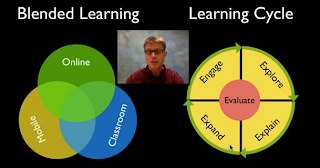
Paul Anderson’s Blended Learning Cycle.
In this video, Mr. Anderson talks about his combination of blended learning and the learning cycle. Blended learning is a combination of online, mobile, and classroom learning. The Learning Cycle contains five key components: Engage, Explore, Explain, Expand, and Evaluate. He uses this system of learning to create his own unique learning style he names QIVERS`.Q: Question-Mr. Anderson begins each unit with a driving question about a subject matter the students are unfamiliar with. I: Investigate- he asks the students to hypothesize what they believe the answer to that question is. V: Video- he gives the students video links with instructions and information so that they can explore the subject matter independently. E: Elaboration- he then explains the subject matter and provides his class with more detailed information. R: Review- in this stage, he reviews with the students one on one to ensure the student understands the information. S: Summary quiz- he gives a quiz to evaluate the students knowledge. What we can learn from Mr. Anderson is a successful way to teach our students. His method allows students to be engrossed in the learning process. He allows them to question freely and learn why they are wrong or right. In this way, he is teaching science and how to be an independent learner at the same time.
Meagan McRae:
This week we had a collaborative group blog post assignment. My group consisted of Chloe Woodham, Brittany Sparks, and myself. The third video was entitled Making Thinking Visible, by Mark Church. In this video Church's students had watched a video the day before concerning early human beginnings. Church then had his students write simple one sentence headlines, in their small groups, to sum up what they had watched and present it to the class. At the end of the lesson Church plans on having them do this project again and discuss how the headlines have changed from the first day to the last day of the lesson. By just writing down a simple headline on a piece of paper, Church's students can see what they have learned and how their knowledge on this subject has increased. Students can then gain further insight from other students headlines through a class discussion. I believe this is a good exercise in the classroom since it is visually showing the students what they have learned over time as well as how they have adapted and changed their opinions.
The second video was entitled Sam Pane 4th Grade. This was an extremely interesting video where Pane had his students create comic strips about internet safety. Since students are going to be using technology more in the classroom, they need to know how to be safe about its use. Each student created a comic strip that incorporated themselves as well as the super hero they had created. One of the subjects covered involved not putting your personal information into a site, while another discussed the importance of using safe search engines. The super comics that the students created were very clever and well done, and the students seemed to really enjoy the project. They enjoyed sharing the comics they had created with their fellow classmates as well as seeing what other students had created. I believe this is a smart way to go about teaching this topic to students. By making the lesson interesting, teachers can teach what may other wise be a boring topic and students can have fun while learning. Along the way students are being creative, enjoying themselves, and learning about a program that they might want to use for another assignment or free time project. Pane is a perfect example of using technology in the classroom effectively and having students really be engaged and active in the classroom.
Brittany Sparks
The fifth video Project Based Learning by Dean Shareski takes the viewers into a high school classroom in Canada. The students in this high school classroom do not learn segmented subjects. Three teachers have come together to combine History, English, and Information Processing. The teachers are embedding the principles of project based learning to create a better and different learning experience for the students. Research has proven that project based learning increases the amount of engaged learners and provides an opportunity for deeper understanding of the material. These teachers use technology in their classroom to enhance student learning. The first time they tried to use project based learning it was successful but, they knew that there was room for improvement. The students in their class room are getting excited about projects they are doing. They are extremely proud of themselves. Another important part of project based learning is it gives the students a chance to use technology to bring the content to life. The teachers in this class have also realized there is more time to give students feedback right away on a project or activity.
The sixth video is Roosevelt Elementary's PBL Program . This video describes how project based learning is a different style of learning. It is a different style because it is indepth learning. PBL is integrated thematic instruction and it is based on real world problems. Teachers provide resources for students. The students then work on a project or presentation. Another important part of PBL that was addressed in this video is the students have a choice. Meaning they are giving them an opportunity to make their own decisions. In a PBL classroom a person will see students learning 2lst century skills. The students will be able to use these skills in the future. The students are learning to work independently and in groups. They are also learning how to communicate with one another, solve problems, and support one another in the classroom. PBL is self motivating and the students at Roosevelt Elementary are truly excited to learn and show what they have accomplished.
In the video Back To The Future, Mr. Brian Crosby tells us about how he gets his class of multicultural and at risk students to learn how to use project based learning. He starts off by telling us about his class and how most of his students do not know what city they live in. Crosby uses technology to gain the interest of his class. The students use laptops to connect to different students around the world. Mr. Crosby collaborated with a local university to create a balloon that would carry a camera and microphone into the different layers of the atmosphere. By doing this, students were able to see first hand the journey that the balloon made. The students were able to create the payload of the balloon and take a hands on approach to this project creating a highly motivating learning environment. They were each asked to write a story about the balloons journey from the perspective of the balloon. These stories were then posted to a class blog along with photos and videos to be shared with the world in a project called “High Hopes”. The students made stratocards with the high hopes that they had for their lives and this also allowed students around the world to post theirs as well. This project also tied into the science atmosphere with cultural and language learning. In this way, children around the world were able to share ideas and information which makes the world a smaller, more neighborly place. What we can learn from this is that teaching is not about giving students busy work and hoping that they will grasp the concepts from that work. Learning is more effective when the students are captivated by the material. We think that teaching is about making the students learn for themselves and from their peers around them. We also believe that by doing projects this allow students to be interactive with each other. By motivating students with exciting projects they will actively absorb information and retain it for life. Mr. Crosby also showed us the value of public sharing when he was able to use technology to allow a young girl with cancer to be part of his class and participate with her peers instead of being homeschooled. That is a beautiful gift and he should be applauded for not allowing that girl to be isolated.
Paul Anderson’s Blended Learning Cycle.
In this video, Mr. Anderson talks about his combination of blended learning and the learning cycle. Blended learning is a combination of online, mobile, and classroom learning. The Learning Cycle contains five key components: Engage, Explore, Explain, Expand, and Evaluate. He uses this system of learning to create his own unique learning style he names QIVERS`.Q: Question-Mr. Anderson begins each unit with a driving question about a subject matter the students are unfamiliar with. I: Investigate- he asks the students to hypothesize what they believe the answer to that question is. V: Video- he gives the students video links with instructions and information so that they can explore the subject matter independently. E: Elaboration- he then explains the subject matter and provides his class with more detailed information. R: Review- in this stage, he reviews with the students one on one to ensure the student understands the information. S: Summary quiz- he gives a quiz to evaluate the students knowledge. What we can learn from Mr. Anderson is a successful way to teach our students. His method allows students to be engrossed in the learning process. He allows them to question freely and learn why they are wrong or right. In this way, he is teaching science and how to be an independent learner at the same time.

Meagan McRae:
This week we had a collaborative group blog post assignment. My group consisted of Chloe Woodham, Brittany Sparks, and myself. The third video was entitled Making Thinking Visible, by Mark Church. In this video Church's students had watched a video the day before concerning early human beginnings. Church then had his students write simple one sentence headlines, in their small groups, to sum up what they had watched and present it to the class. At the end of the lesson Church plans on having them do this project again and discuss how the headlines have changed from the first day to the last day of the lesson. By just writing down a simple headline on a piece of paper, Church's students can see what they have learned and how their knowledge on this subject has increased. Students can then gain further insight from other students headlines through a class discussion. I believe this is a good exercise in the classroom since it is visually showing the students what they have learned over time as well as how they have adapted and changed their opinions.
The second video was entitled Sam Pane 4th Grade. This was an extremely interesting video where Pane had his students create comic strips about internet safety. Since students are going to be using technology more in the classroom, they need to know how to be safe about its use. Each student created a comic strip that incorporated themselves as well as the super hero they had created. One of the subjects covered involved not putting your personal information into a site, while another discussed the importance of using safe search engines. The super comics that the students created were very clever and well done, and the students seemed to really enjoy the project. They enjoyed sharing the comics they had created with their fellow classmates as well as seeing what other students had created. I believe this is a smart way to go about teaching this topic to students. By making the lesson interesting, teachers can teach what may other wise be a boring topic and students can have fun while learning. Along the way students are being creative, enjoying themselves, and learning about a program that they might want to use for another assignment or free time project. Pane is a perfect example of using technology in the classroom effectively and having students really be engaged and active in the classroom.

Brittany Sparks
The fifth video Project Based Learning by Dean Shareski takes the viewers into a high school classroom in Canada. The students in this high school classroom do not learn segmented subjects. Three teachers have come together to combine History, English, and Information Processing. The teachers are embedding the principles of project based learning to create a better and different learning experience for the students. Research has proven that project based learning increases the amount of engaged learners and provides an opportunity for deeper understanding of the material. These teachers use technology in their classroom to enhance student learning. The first time they tried to use project based learning it was successful but, they knew that there was room for improvement. The students in their class room are getting excited about projects they are doing. They are extremely proud of themselves. Another important part of project based learning is it gives the students a chance to use technology to bring the content to life. The teachers in this class have also realized there is more time to give students feedback right away on a project or activity.

The sixth video is Roosevelt Elementary's PBL Program . This video describes how project based learning is a different style of learning. It is a different style because it is indepth learning. PBL is integrated thematic instruction and it is based on real world problems. Teachers provide resources for students. The students then work on a project or presentation. Another important part of PBL that was addressed in this video is the students have a choice. Meaning they are giving them an opportunity to make their own decisions. In a PBL classroom a person will see students learning 2lst century skills. The students will be able to use these skills in the future. The students are learning to work independently and in groups. They are also learning how to communicate with one another, solve problems, and support one another in the classroom. PBL is self motivating and the students at Roosevelt Elementary are truly excited to learn and show what they have accomplished.

Saturday, April 5, 2014
Monday, March 31, 2014
C4K March
C4K #6 Meliana
This weeks C4K student was Meliana. She posted a fitness picture as well as a video explaining her fitness picture. Meliana's teacher likes the students to make a picture to go with the story that they tell on their video. I believe this is a great way to incorporate not one but two types of technology into the classroom. The students have to use a particular program to make their pictures and then have to record their videos and post them. The students seem really excited to be doing this, and according to Meliana's teacher the students love being able to share what they have done with other people. I let Meliana know that she did a good job not only on her fitness picture but also her video.
C4K #7 Jacob
This weeks C4K student was Jacob, a student in Mr. Barks and Mrs. Nua's class. He did a journal entry post as a soldier in the Boer War. There were three journal entries listed and each depicted what life for a soldier would have been like. Jacob did a very good job placing himself in the shoes of a soldier. He discussed what the food was like, the scenes he would have seen, as well as how they had pay for their rations. I really enjoyed his post and I believe it was very well written. Jacob even included a picture that he had made which had his face cropped in the place of a soldiers face.
C4K #8 Sapphire
This weeks C4K student was Sapphire, a student in Ms. Squires class. Sapphire did a post entitled Sapphire my bio poem. She posted two biography poems both describing herself, her likes, and her dislikes. Each poem offered the reader more information about what Sapphire liked, what she was afraid of, and who she was. I told Sapphire that I remember doing these in both high school and middle school English classes. I also told her that she did a very good job on both her biography poems.
This weeks C4K student was Meliana. She posted a fitness picture as well as a video explaining her fitness picture. Meliana's teacher likes the students to make a picture to go with the story that they tell on their video. I believe this is a great way to incorporate not one but two types of technology into the classroom. The students have to use a particular program to make their pictures and then have to record their videos and post them. The students seem really excited to be doing this, and according to Meliana's teacher the students love being able to share what they have done with other people. I let Meliana know that she did a good job not only on her fitness picture but also her video.
C4K #7 Jacob
This weeks C4K student was Jacob, a student in Mr. Barks and Mrs. Nua's class. He did a journal entry post as a soldier in the Boer War. There were three journal entries listed and each depicted what life for a soldier would have been like.

C4K #8 Sapphire
This weeks C4K student was Sapphire, a student in Ms. Squires class. Sapphire did a post entitled Sapphire my bio poem. She posted two biography poems both describing herself, her likes, and her dislikes. Each poem offered the reader more information about what Sapphire liked, what she was afraid of, and who she was. I told Sapphire that I remember doing these in both high school and middle school English classes. I also told her that she did a very good job on both her biography poems.
C4T # 3 Ken Halla
C4T #3 Comment #1
Ken Halla is a high school history teacher, and this week on his blog he posted The College Application Process. This post had a video ,as well as a link from where the video came from, that would be useful for teachers in high school grade levels to view. It discussed the college application process and admission process. Teachers would benefit from viewing this video to inform their students about what colleges are looking for. I know when I was in high school it would have been beneficial to have my teachers know this information and be able to guide me.
C4T Comment #2
This week on Ken Halla's blog he posted a video on how to edit YouTube videos. Halla was planning on using YouTube to have his students create a video to go with their family immigrant project. Since his students all have YouTube accounts set up, this will be a good tool for him to use to have his students produce these videos. I was not aware that YouTube was also a video editing tool until I viewed this post. It seems to be very user friendly and I believe it will be a good tool for not only Halla's students, but for myself as well.
Ken Halla is a high school history teacher, and this week on his blog he posted The College Application Process. This post had a video ,as well as a link from where the video came from, that would be useful for teachers in high school grade levels to view. It discussed the college application process and admission process. Teachers would benefit from viewing this video to inform their students about what colleges are looking for. I know when I was in high school it would have been beneficial to have my teachers know this information and be able to guide me.
C4T Comment #2
This week on Ken Halla's blog he posted a video on how to edit YouTube videos. Halla was planning on using YouTube to have his students create a video to go with their family immigrant project. Since his students all have YouTube accounts set up, this will be a good tool for him to use to have his students produce these videos. I was not aware that YouTube was also a video editing tool until I viewed this post. It seems to be very user friendly and I believe it will be a good tool for not only Halla's students, but for myself as well.

Sunday, March 30, 2014
Blog Post #10
What can we learn from Sir Ken Robinson?
In Sir Ken Robinson's video, I learned that teachers need to create environments and learning conditions where children will flourish. Students all have different learning styles, and just reading and writing down facts does not work for every child. Robinson gives the example that you can give two children the same exact thing and get two different results from each child. For example, one might show an interest in the assignment you have given them and excel, while the other will have no interest and barely get through the assignment. By creating an assignment that has multiple parts or by using technology, you can create a lesson that will be interesting for all students. Robinson suggest that your teaching evolve and that you customize your lesson plans and how you teach based on your students needs.

Project #15 Lesson Plan #3
For this weeks lesson plan I decided to focus on first grade science. In this lesson I will have students research a certain sea creature, in groups of two, and do "dash" facts on them. "Dash" facts are short abbreviated facts that the children have to pick out of sentences. This way they are learning what is important in the sentences, and are only listing the facts. After they have found the facts students will make an image of their sea creature and present to the class. The link to my lesson plan can be found here.

Wednesday, March 26, 2014
Sunday, March 23, 2014
Blog Post #9
What can I learn from Ms. Cassidy?
This weeks blog post we were given video interviews to watch between Ms. Cassidy and Dr. Strange.
Interview with Kathy Cassidy Part 1
Interview with Kathy Cassidy Part 2
Interview with Kathy Cassidy Part 3
Upon watching these videos, I learned a lot about technology use in the classroom and how it benefits students. In First Graders in Ms. Cassidy's class, you learn about what kind of technology tools Ms. Cassidy has her first grade class use. She makes use of the computers, blogs, Wiki, Skype, Nintendo DS, as well as student made videos to help her students learn and communicate with other students in other states. In this video students tell you that they enjoy blogging and that it actually helps with their writing skills.
One of the issues that is brought up in the conversations between Dr. Strange and Ms. Cassidy is how to protect student identities, as well as protect them from certain material on the internet. Ms. Cassidy sends forms home at the beginning of the year that tells parents that their child's work will be posted online. In order to protect student identity, first names are only used and students are not to post their pictures with their name tagged. This is a good way to protect student identity and still allow parents and family members to find their child's blog to view it. I will definitely be using this as a model to follow when using blogs in my classroom. When it comes to sites that the students might accidentally access online, I might handle it a little bit differently. Though I will probably have links to different sources that children can use on my blog page, I will probably also have different approved links on the computer home screen.
Another good teacher tool that Ms. Cassidy mentions is Twitter. She says that Twitter is a good tool for teachers to collaborate with and share information. She recognizes that Twitter and blogs are not for everyone but that there are other avenues to help you become more tech savvy. Technology is not going anywhere since it is beneficial to student learning as well as teachers learning. Teachers need to keep up with what is happening with technology so that they can find more and more resources to help their students learn. I believe I will be using all of Ms. Cassidy's techniques because they seem to be working for her. I am going to remember her advice on keeping myself up to date on what the latest technologies are and come up with new ways to implement them in my classroom.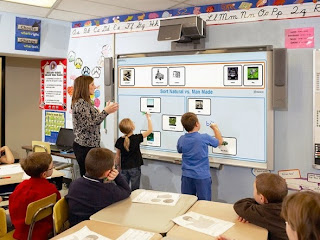
This weeks blog post we were given video interviews to watch between Ms. Cassidy and Dr. Strange.
Interview with Kathy Cassidy Part 1
Interview with Kathy Cassidy Part 2
Interview with Kathy Cassidy Part 3
Upon watching these videos, I learned a lot about technology use in the classroom and how it benefits students. In First Graders in Ms. Cassidy's class, you learn about what kind of technology tools Ms. Cassidy has her first grade class use. She makes use of the computers, blogs, Wiki, Skype, Nintendo DS, as well as student made videos to help her students learn and communicate with other students in other states. In this video students tell you that they enjoy blogging and that it actually helps with their writing skills.
One of the issues that is brought up in the conversations between Dr. Strange and Ms. Cassidy is how to protect student identities, as well as protect them from certain material on the internet. Ms. Cassidy sends forms home at the beginning of the year that tells parents that their child's work will be posted online. In order to protect student identity, first names are only used and students are not to post their pictures with their name tagged. This is a good way to protect student identity and still allow parents and family members to find their child's blog to view it. I will definitely be using this as a model to follow when using blogs in my classroom. When it comes to sites that the students might accidentally access online, I might handle it a little bit differently. Though I will probably have links to different sources that children can use on my blog page, I will probably also have different approved links on the computer home screen.
Another good teacher tool that Ms. Cassidy mentions is Twitter. She says that Twitter is a good tool for teachers to collaborate with and share information. She recognizes that Twitter and blogs are not for everyone but that there are other avenues to help you become more tech savvy. Technology is not going anywhere since it is beneficial to student learning as well as teachers learning. Teachers need to keep up with what is happening with technology so that they can find more and more resources to help their students learn. I believe I will be using all of Ms. Cassidy's techniques because they seem to be working for her. I am going to remember her advice on keeping myself up to date on what the latest technologies are and come up with new ways to implement them in my classroom.

Sunday, March 16, 2014
Blog Post #8
What are some 21st century learning and communicating tools?
When looking for new tools that teachers are using to help facilitate 21st century learning and communicating I ran across Edudemic. This website gave 50 Education Technology Tools Every Teacher Should Know About, which ranged from social learning, to help with lesson planning. One website I found on here that I thought would be helpful and fun for elementary students was FunBrain. After playing around on this website I found that your students can play educational games, read books, or just have a good free time game to play. Each game or book is set up to your students grade level and skill and allows them to learn in a fun interactive way. I would definitely use the math games offered on this site to help students learn math and improve their basic math skills. The grammar and reading tools that FunBrain offers are beneficial in getting students engaged in reading, as well as help them improve their grammar skills in a fun way.
Educreations was yet another website that I believe would be helpful to use in the classroom. Topics that have already been shared on this website cover every subject in school and then some. Teachers, or students, use iPads to post their presentations online to share with the classroom or others around the world. To me this tool would be especially beneficial to use for math "how to" videos. The presentation can be viewed online and looks like an on-screen white board. To me this seems like a better option than doing a YouTube video of a lesson. The student can clearly see what is being written in front of them, and the teacher does not have to worry about standing in the way of the problem while it is being worked. Students can pause the video if they need to catch up, or go back and view how to work a problem again.
A tool that I found which would be beneficial to me as a future educator was Teachers Pay Teachers. I have actually seen this site in action during my observation hours. This site is loaded with worksheets, coloring sheets, and activities for different subjects and topics. Teachers Pay Teachers allows you to access other teachers activities and ideas from around the world. All of the items offered can be printed off for your use in the classroom. Some are offered for free while others you have to pay a small fee to use. I think I would use this website often as a teacher to help bring new material into my classroom. I can also get helpful and creative ideas to teach a new subject to my students.
When looking for new tools that teachers are using to help facilitate 21st century learning and communicating I ran across Edudemic. This website gave 50 Education Technology Tools Every Teacher Should Know About, which ranged from social learning, to help with lesson planning. One website I found on here that I thought would be helpful and fun for elementary students was FunBrain. After playing around on this website I found that your students can play educational games, read books, or just have a good free time game to play. Each game or book is set up to your students grade level and skill and allows them to learn in a fun interactive way. I would definitely use the math games offered on this site to help students learn math and improve their basic math skills. The grammar and reading tools that FunBrain offers are beneficial in getting students engaged in reading, as well as help them improve their grammar skills in a fun way.
Educreations was yet another website that I believe would be helpful to use in the classroom. Topics that have already been shared on this website cover every subject in school and then some.

A tool that I found which would be beneficial to me as a future educator was Teachers Pay Teachers. I have actually seen this site in action during my observation hours. This site is loaded with worksheets, coloring sheets, and activities for different subjects and topics. Teachers Pay Teachers allows you to access other teachers activities and ideas from around the world. All of the items offered can be printed off for your use in the classroom. Some are offered for free while others you have to pay a small fee to use. I think I would use this website often as a teacher to help bring new material into my classroom. I can also get helpful and creative ideas to teach a new subject to my students.
Project #14 Project-Based Learning Lesson Plan #2
This weeks project was to do an individual project-based learning lesson plan. I chose to do a lesson plan on prominent African American figures in history. This lesson plan is geared toward 2nd grade history students and can be viewed here.


C4T #2 Elvira Deyamport
C4T #2 Comment #1
In Elvira Deyamport's post The Greatest Stories Never Told: Showcasing Our Gifted Classrooms Through Social Media and WebTools, she discusses how her journey to the National Association for Gifted Children Conference all began with her class blog. She goes on to say that her students have been able to collaborate with other students around the globe and that students are excited about learning.

C4T #2 Comment #1
Ms. Elvira had not written a newer post for this weeks C4T, so I went to a previous post of hers entitled Animal Research Poems. Ms. Elvira had her students research an endangered animal and then write a poem based on templates she had made. A few of her students finished products are posted on her blog. She had her students create their projects using Pages, a program I was not familiar with until I read this post. This program is designed to be used for iPad, iPhone, and iPod touch. Pages helped students to create beautiful and colorful projects on their own, as well as help Ms. Elvira sneak a helpful and fun tool into her lesson plan.
Friday, March 14, 2014
Sunday, March 2, 2014
Blog Post #7
What can we learn about teaching and learning from Randy Pausch?
This video was possibly one of the most inspirational videos I have ever seen. Randy Pausch was a positive and enthusiastic speaker and you could really tell he was passionate about his work. In his lecture he covered different times of his life that influenced who he was as well as people that influenced him. One story he told that interested me was when he was young and played football. He said that his coach was very focused on fundamentals and that this is what they worked on most of football practice. Though at the time he didn't see it, he later realized that this helped him in football as well as his life. You have to get the fundamentals down before you can jump into the big stuff. This is a great lesson to use in the classroom since you need to have students get the fundamentals down before you expect them to tackle bigger projects. Pausch also said that he was not that good at football and that his coach would ride him to do better. The assistant coach noticed that Pausch was feeling upset and told Pausch that the coach was only doing this because he wanted him to do his best. The assistant coach said that "when your screwing up and nobody says anything to you anymore, that means they gave up." I believe that this quote is a good one to live by and remember as a teacher. You always want to push your students to do their best because if you stop pushing them they will realize you gave up on them and will give up on themselves.
Another lesson that I learned from Paush was his brick wall theory. He said that "the brick walls are there to show us how badly we want things, they will not stop those who want it badly enough." This is just an amazing quote to remember when life gets tough or you get frustrated with the cards you are dealt in life. This is an awesome learning experience for children and adults since things will come up in life that might change the course of what you were trying to accomplish. Those who want it badly enough will overcome these obstacles and reach there goals.
Pausch also gave examples of how much students enjoy project based learning. He told how his classes were set up for his masters students and how they went above and beyond what he had expected. His classes are set up to where students do five projects in a semester that are two weeks long. Students were to present these projects to just the classroom, but the project grew. Soon the whole school, parents, and friends where involved in viewing what his students had accomplished. Students were excited and eager to share there work with everyone and the projects they created were amazing. In the video you can see one of the projects that his students made that even has a little twist to it. These projects helped lead to the creation of ALICE which is a virtual reality program that young students can use to help learn difficult concepts. Children have fun since learning is approached as a story-telling activity, and may even forget that they are learning. I learned so much from Randy Pausch's last lecture that I can not even begin to list it all. Watching this video really does give you a different outlook on how to approach teaching and learning. I recommend that anyone going into education or currently teaching view this video.
This video was possibly one of the most inspirational videos I have ever seen. Randy Pausch was a positive and enthusiastic speaker and you could really tell he was passionate about his work. In his lecture he covered different times of his life that influenced who he was as well as people that influenced him. One story he told that interested me was when he was young and played football. He said that his coach was very focused on fundamentals and that this is what they worked on most of football practice. Though at the time he didn't see it, he later realized that this helped him in football as well as his life. You have to get the fundamentals down before you can jump into the big stuff. This is a great lesson to use in the classroom since you need to have students get the fundamentals down before you expect them to tackle bigger projects. Pausch also said that he was not that good at football and that his coach would ride him to do better. The assistant coach noticed that Pausch was feeling upset and told Pausch that the coach was only doing this because he wanted him to do his best. The assistant coach said that "when your screwing up and nobody says anything to you anymore, that means they gave up." I believe that this quote is a good one to live by and remember as a teacher. You always want to push your students to do their best because if you stop pushing them they will realize you gave up on them and will give up on themselves.
Another lesson that I learned from Paush was his brick wall theory. He said that "the brick walls are there to show us how badly we want things, they will not stop those who want it badly enough." This is just an amazing quote to remember when life gets tough or you get frustrated with the cards you are dealt in life. This is an awesome learning experience for children and adults since things will come up in life that might change the course of what you were trying to accomplish. Those who want it badly enough will overcome these obstacles and reach there goals.
Pausch also gave examples of how much students enjoy project based learning. He told how his classes were set up for his masters students and how they went above and beyond what he had expected. His classes are set up to where students do five projects in a semester that are two weeks long. Students were to present these projects to just the classroom, but the project grew. Soon the whole school, parents, and friends where involved in viewing what his students had accomplished. Students were excited and eager to share there work with everyone and the projects they created were amazing. In the video you can see one of the projects that his students made that even has a little twist to it. These projects helped lead to the creation of ALICE which is a virtual reality program that young students can use to help learn difficult concepts. Children have fun since learning is approached as a story-telling activity, and may even forget that they are learning. I learned so much from Randy Pausch's last lecture that I can not even begin to list it all. Watching this video really does give you a different outlook on how to approach teaching and learning. I recommend that anyone going into education or currently teaching view this video.
Subscribe to:
Posts (Atom)